Making Design Decision-Making Visible with Gazelle

Role
Product Design and Engineering
Team
Assistant Researchers: Victoria Hays & Yuna Lee
Time
January 2026 — Present
This ongoing project started as an idea from my advisor, André van der Hoek at UC Irvine. Students were already using Generative AI with the scaffolding taught, so we asked ourselves what outcomes could be possible by designing both to be even more integrated.
What is Gazelle?
Gazelle is a tool that visualizes GACIOD into a matrix, and integrates Generative AI to assist students through the design process.
What is GACIOD?
GACIOD, which is short for Goals, Assumptions, Constraints, Ideas, Opinions, and Decisions, is a framework used by Professor André van der Hoek at UC Irvine to guide students through design thinking in Software Design I.
The Design and Engineering Opportunity
How we Built…
Leveraging Figma and Claude Code, I designed Gazelle around simple mockups and generated interfaces. Sometimes a build came first, and then the design document would be updated accordingly.
Technical Considerations…
The tech stack used was React, Node.js, Drizzle, and Neon for the database and authentication. The Gazelle Chat is powered by GPT-5-nano, with structured outputs for specific modes: generation, insights, critique, improve.

It worked, but how
would students use it?
With feedback from Professor Stacy Branham and peers in our UI Design & Evaluation class, our design team ran think-aloud observations and exit interviews with five participants over ten weeks
Rapidly-prototyping, from insight to code generation.
After each user-testing session, our team took our results and prompted Claude accordingly. Each session with different users brought new-features in real time.
Claude, the Collaborator.
Claude Code was used to rapidly implement changes across the codebase, informed from our research with users. Claude Cowork was beneficial for aggregating chat-logs and research, along with small things like taglines.
RegEx versus NLP
To determine which "mode" (generation, insights, critique, improve) the structured response would be, Claude initially used regular expressions.
Given the free-response nature of chat queries, I chose to let GPT determine the "mode" in the structured response.
"How might we implement a way to do this: If I communicate with the chat to change something to the matrix, how do we go about reflecting those changes? Would we also need to tune the system prompt?"
Introspection
To present this case study, I also used Claude Cowork to analyze the Claude Code conversations stored locally, along with other research artifacts.
"I want you to go over our chat histories and give me an executive summary of how this project has evolved, especially since the majority of the coding was done by yourself (Claude)."
Lack of Feature Visibility
In early testing, users were unaware of the Gazelle Chat. Hidden away to the right, and left blank. Furthermore, the onboarding experience (which imitated the start page of leading GenAI platforms) left almost all users unsure of how to begin.
Our next steps from here was to make the chat more prominent, and to create a better onboarding experience that guided users rather than expect them to know what to do from the get-go.
Anon. Software Design Undergraduate Student
A participant struggled to find and use the chat.
"There's a chat? Oh, there is a chat. Okay. Um, what should I ask?" [P2]
Anon. Design Graduate Student
Another participant was overwhelmed by the amount of content generated by ChatGPT.
When brought into the interface with a lot of pre-generated content, this user became overwhelmed [P3].
Hierarchy, Colors, and Clarification
In later testing, we sought out to address the decisions that were made by Generative AI.
Hierarchy
Next to making the chat prominent by moving it to the left, we took into consideration the grouping of GACIOD. Originally, the GACIOD matrix was 3x2 (see previous section). By changing to a 2x3 format, we created better visual contrast between the chat and matrix.
Colors
We agreed with users that our creativity tool did not "scream creative" and added colors, changed our main typography to Cal Sans, and added icons for association.
Clarification
We tested with a mixture of Software Design I and non-Software Design I students and a main tension point was how users would be introduced to GACIOD. We added clarifying text that helps new users and serves as a reminder to existing ones.

Once again, Gazelle.

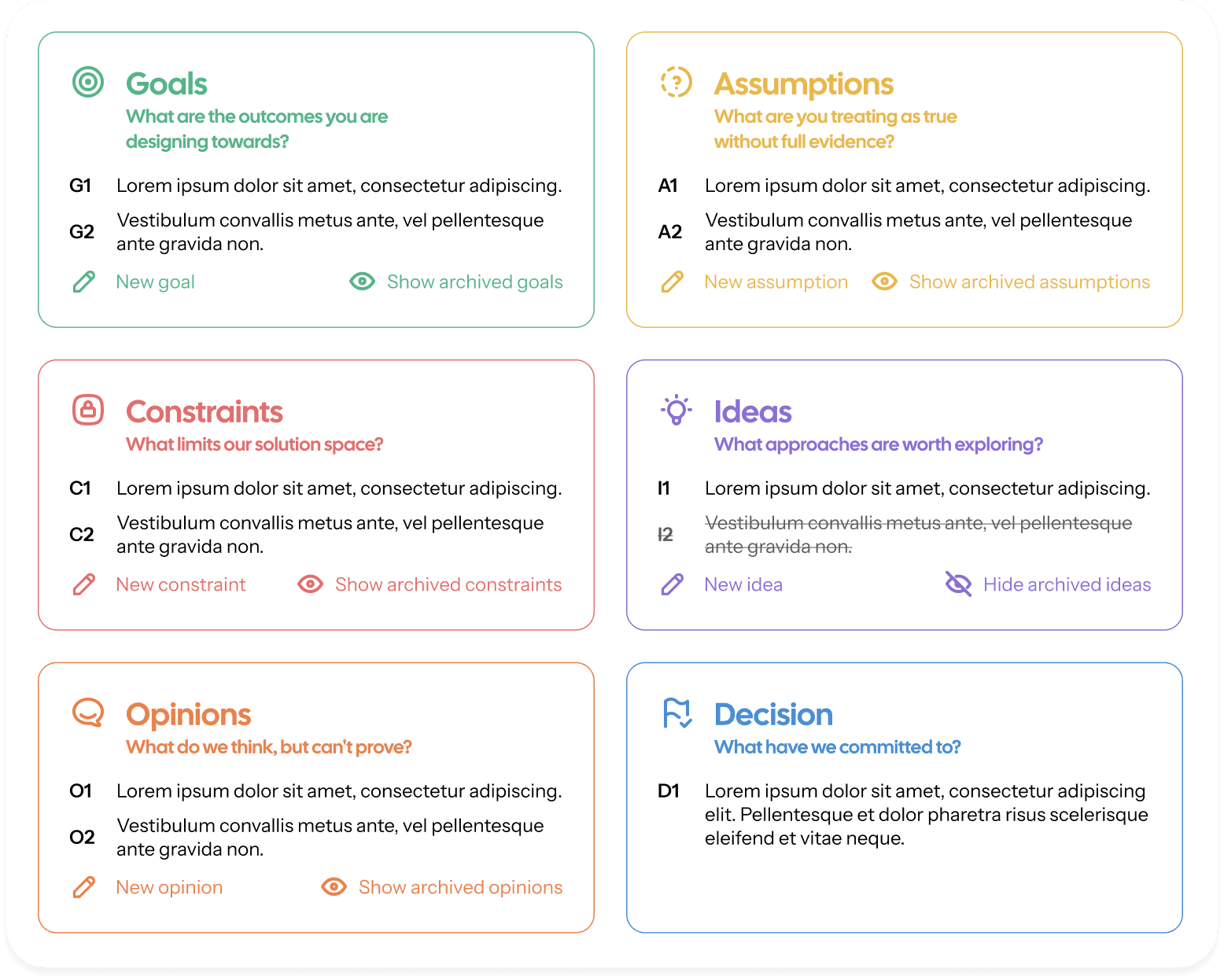

Build momentum, not roadblocks. GACIOD starts with a question, and Gazelle helps you ask the right one. No matter the amount of context you want to share.

An AI that asks, doesn’t just tell. Gazelle's system prompt was designed to carefully inspire and challenge users.

"I didn't think of that one." Gazelle acts as a thinking partner when you don't have a human around to help.
Reflection
As one of my first post-undergraduate projects, Gazelle helped me in many ways.
Human-AI Collaboration
As a designer who takes technical considerations into mind, I loved the momentum designing between code and canvas.
Since we did not use AI skills or MCP apps, a lot of this project was cleaning up and improving aspects of AI-generated design.
User Observations
This is my first project involving actual working software in user observations.
Compared to my previous methods of presenting artifacts, or walking someone through Figma prototypes, we were able to gather richer data this way.
Branding Endeavors
The past ten weeks of iterative feedback, testing, and presenting has taught me how to better position features in different contexts.
Conclusion
Gazelle is an ongoing research project at the University of California, Irvine, where my hope is that in the future, real students will get to learn aspects of Software Design (interaction, architecture, etc.) with this tool.